


- Promotions
BROTHER Color laser printers
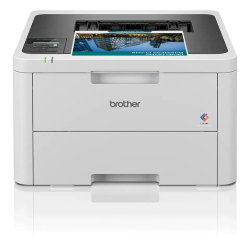
- Product Code: 2004977766823739
- Rank: 0
- Print format:: A4
- Recommend. monthly load:: 3 000 copies
- Color print speed:: 18 pages per minute
- Printing technology:: Laser
- Wireless network:: Yes
- Print speed black:: 18 pages per minute
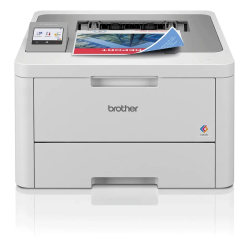
- Product Code: 2004977766823838
- Rank: 0
- Wireless network:: Yes
- Print format:: A4
- Double-sided printing:: Automatic
- Printing technology:: Laser
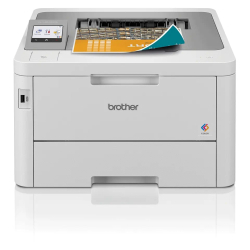
- Product Code: 2004977766823876
- Rank: 0
- Printing technology:: Laser
- Double-sided printing:: Automatic
- Print format:: A4
- Recommend. monthly load:: 4 000 copies
- Wireless network:: Yes
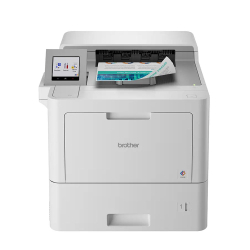
- Product Code: 2004977766813969
- Rank: 0
- Color print speed:: 40 pages per minute
- Printing technology:: Laser
- Recommend. monthly load:: 12 000 copies
- Print format:: A4
- Print speed black:: 40 pages per minute
- Network:: Yes
- Double-sided printing:: Automatic
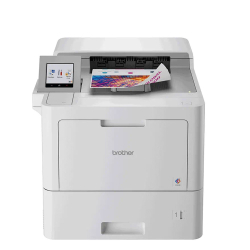
- Product Code: 2004977766813976
- Rank: 0
- Print format:: A4
- Printing technology:: Laser
- Double-sided printing:: Automatic
- Color print speed:: 40 pages per minute
- Print speed black:: 40 pages per minute
- Network:: Yes
- Wireless network:: Yes
- Recommend. monthly load:: 15 000 copies
The BROTHER laser color printers category in the OK Office online store brings together reliable and highly efficient devices designed for high-quality color and black-and-white printing in an office environment or for intensive home use. These solutions are suitable for small and medium-sized offices, workgroups and users who are looking for professional quality, speed and economy in everyday document work.
Main advantages of BROTHER laser color printers
Choosing a BROTHER laser color printer brings a number of practical benefits that improve efficiency and reduce operating costs in the long term. Here are the key advantages of this technology:
- High print speed. Allows for fast printing of large volumes of documents at speeds of up to 40 pages per minute, which is ideal for busy offices.
- Consistent color quality. Laser technology provides uniform and saturated colors, suitable for presentations, reports and marketing materials.
- Economical in large volumes. The lower cost per page compared to inkjet devices makes these printers extremely efficient for regular printing.
- Reliability and long service life. Designed for stable operation, the devices withstand a monthly load of 3,000 to 12,000 pages depending on the model.
Thanks to these features, BROTHER is establishing itself as a reliable choice for business users who value efficiency and quality.
Functionality that improves the workflow
Modern BROTHER laser color printers offer intelligent functions that facilitate daily work and increase productivity. Among the most valuable features are:
- automatic two-sided printing for faster and more economical document printing;
- network connectivity for centralized management and sharing in an office environment;
- wireless connection for printing directly from laptops, smartphones and tablets;
- support for A4 format - standard for most business and administrative documents.
These functionalities provide flexibility and convenience, while reducing document processing time.
Who are BROTHER color laser printers suitable for?
This selection meets the needs of different users and business environments. BROTHER laser color printers are an excellent choice for:
- small and medium-sized offices that need reliable and fast printing;
- workgroups that need a shared network printer;
- companies that print color presentations, reports, and marketing materials;
- home offices with high demands on print quality and efficiency.
The flexibility and variety of models make it easy to find a solution that meets your specific needs.
View the available offers in the category and choose a BROTHER laser color printer that will optimize your workflow, improve print quality, and ensure reliable operation.
FAQ for Color laser printers
What is the difference between laser and inkjet printers?
Laser printers, like those from Brother, use toner and are more efficient for high-volume printing due to their faster speed. On the other hand, inkjet printers are better suited for printing high-quality color images and photos.
Why is my Brother printer not printing in color?
If your Brother printer is not printing in color, first check that the toner cartridges are properly installed and not low. Also, make sure that the driver settings are correct and that you have selected color printing from your computer.
How do I connect my Brother laser printer to my wireless network?
To connect your Brother printer to a wireless network, use the printer menu to select Wi-Fi settings and follow the on-screen instructions. Make sure the printer is within range of your router and enter the network password correctly.
Which is better for the office: a Brother color laser printer or another brand?
Brother printers are known for their reliability and economy, making them a favorite for office use. They also offer a variety of features and easy maintenance, making them an excellent choice compared to other brands.